Páginas

Sunday, 27 September 2020

George Seurat

Georges-Pierre Seurat (1859 – 1891) was a French post-Impressionist artist. He is best known for devising the painting techniques known as pointillism. 


Seurat's artistic personality combined qualities that are usually supposed to be opposed and incompatible: on the one hand, his extreme and delicate sensibility, on the other, a passion for logical abstraction and an almost mathematical precision of mind.

His large-scale work A Sunday Afternoon on the Island of La Grande Jatte (1884–1886) altered the direction of modern art by initiating Neo-impressionism, and is one of the icons of late 19th-century painting.


Here is one important painting called "Honfleur Port". 


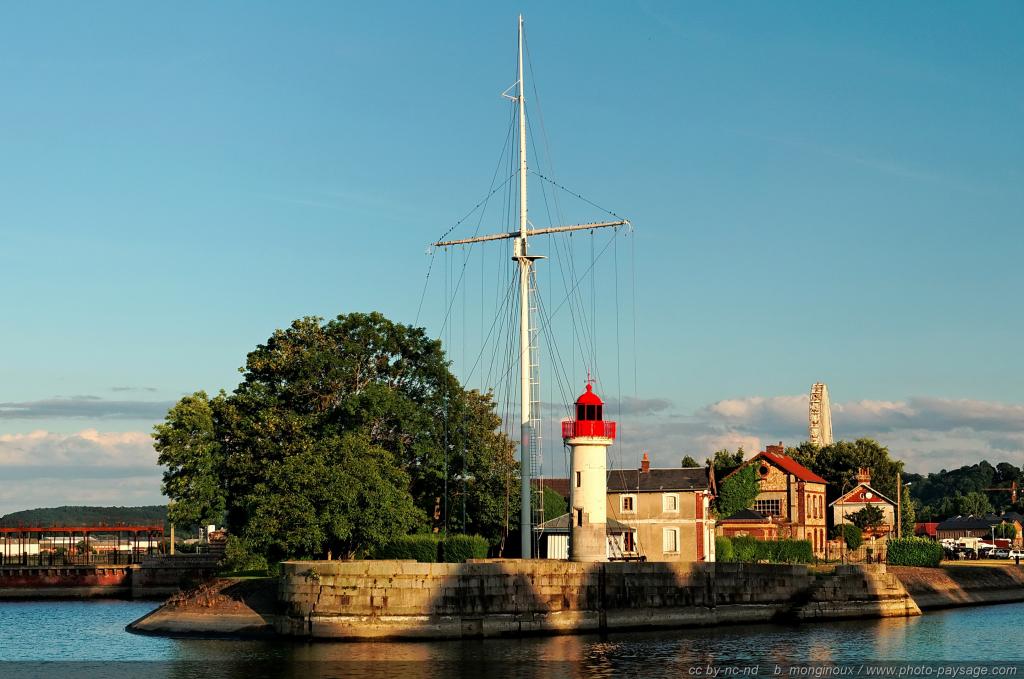
This place is in the north of France and here I'll show you some pictures of the "real place" and some other drawings.


Here you can see the real lighthouse.


Tuesday, 22 September 2020

Crossword

As you may have already guessed this crossword (or at least most of the words in this crossword) has to do with things related to a house. Here is a video you can watch:


Now the clue! First let me show you the crossword:


To have something is the same as to say "to own". Rememeber the word "owner" for example.

If we say "stay the same" that means that nothing changes. Another way of saying that is to use the word "remain". 

I hope this helps! Tell me waht do you think? Do you need more help?

Thursday, 17 September 2020

A great new start!

So! Here we are again! It was fantastic to see you again at school! Let me give you my best welcome!

Let's start a new year full of great things and a lot of learning. To start with let me tell you that we are going to use Milton Travelers and the username and password are going to be the same until new order. You've got one assignment already settled. 

Here is a photo of how I imagine this year:


Do you like it? What do you think about it?

During these days I'm going to ask you to update your Google Account and soon I'll provide you with the new code for the class. 

Tuesday, 15 September 2020

Cómo cambiar el nombre de tu cuenta Google

En ocasiones nos puede interesar cambiar nuestra información en nuestra cuenta de google. Eso hace posible que luego cuando usemos una clase en Google Classroom los nombres de los alumnos se vean con mayor claridad y orden, evitando errores.

Pasos

1. Vete a Google y entra en tu cuenta pinchando en la derecha. Es un círculo que tendrá una letra o foto que hayas puesto. Si no tienes cuenta de Google deberás crear una. Aquí tienes ayuda


2. Pincha en "Gestionar tu cuenta de Google". Aparece un menú a la izquierda. 


3. Pincha en "Información personal". Ahí te sale la foto, nombre, fecha de nacimiento, sexo, contraseña...


4. Pincha en "Nombre". Es posible que Google te envíe un número a tu teléfono móvil como medida de seguridad. Ahora ya puedes cambiar tu nombre y apellido, de la siguiente forma:


En Nombre pon tu número de clase seguido de tu nombre. Por ejemplo: 04 Marta

Los números irán numerados así: 01, 02, 03, 04, etc.

5. En Apellido, pon tu apellido. 


Con estas instrucciones ya sabes cómo cambiar tu nombre en la cuenta de google. Si tienes más dudas es muy fácil buscar tutoriales en youtube o en google. You can also find them in English. Note that there is considerable more information about google accounts in English than in Spanish. 

Here is an example for mobile phones:


Thursday, 18 June 2020

Vocabulary challenge!

What a better way of finishing the school year that to solve a crossword?

Here is the last one!


Enjoy! 😄😄

Wednesday, 17 June 2020

The Golden Age


Now, are you ready for the world Challenge in the Modern Ages?

Click HERE TO PLAY. You can do it as many times as you wish. Just change your nickname with a number at the end. Try to get the highest mark possible and share your experience in the comments. Do you like the game?

Game PIN: 08667371

Enjoy! 😄😄😄